Choose players and rounds
Select 12 players for three tables or 16 for four tables. Choose three or four rounds. Add one name per line; empty positions receive player numbers. Use an initial or surname when two guests have the same name.
THE MAHJONG TABLE ROTATION GENERATOR
Create a free mahjong table rotation for 12 or 16 players.
Choose 3 or 4 rounds, then print, save a PDF, or export CSV.
No signup. Your roster stays in your browser tab.
YOUR GAME PLAN
12 players · 3 tables · 4 rounds
54unique tablemate pairs
18pairs meet twice
4 of 4different seats per player
Find your table, take your seat, and enjoy the company.
A LITTLE HOST HELP
Select 12 players for three tables or 16 for four tables. Choose three or four rounds. Add one name per line; empty positions receive player numbers. Use an initial or surname when two guests have the same name.
Select Generate rotation after changing the inputs. Browse each round to see the table and East, South, West or North seat assigned to every player. Review the repeat-pair summary before sharing the plan.
Choose By table for a host's overview or Player cards for individual instructions. Print / PDF opens your browser's print dialog. Export CSV downloads the assignments for all rounds in a spreadsheet-friendly file.
BEFORE YOUR GUESTS ARRIVE
This mahjong table rotation generator arranges people at four-person tables between scheduled rounds. It is for hosts who want guests to meet different tablemates without working out every move on paper. A round here means one block of play in your event; it does not mean a hand, a wind round, or a complete game under a particular rule set. Decide how long each block lasts with your group.
Use the free rotation planner for a club afternoon, a neighborhood gathering, or a social mahjong night with exactly 12 or 16 participants. Every player has a seat in every round, with no byes. The plan does not assign skill levels, keep partners together, or accommodate an absent player. Confirm attendance first so the printed instructions match the people at your tables.
For 12 players, set up three tables with four seats each. Our three-round template produces 45 different tablemate pairs, with nine pairs meeting twice. The four-round template produces 54 different pairs, with 18 pairs meeting twice. No pair meets more than twice in either supported plan. The on-page summary names the repeated pairs so a host can check the tradeoff.
Each person receives three different seat labels over three rounds or all four labels over four rounds. Changing a name changes the label attached to a position; it does not search for a new draw. This plan is useful for a small social club that accepts some repeat company. It is a checked template, not a claim that the draw is mathematically optimal under every possible constraint.
For 16 players, arrange four tables. No tablemate pair repeats in our three- or four-round templates. Three rounds produce 72 different pairs across the event; four rounds produce 96. In the four-round plan, each player meets 12 different people and uses East, South, West and North once each. They will not meet all 15 other participants within those four rounds.
The numbered players in the example below show how the first two rounds regroup the same roster. Numbers identify roster positions, not scores or rankings. In the live tool, player names replace those numbers. Use the round tabs to see the complete schedule, or switch to Player cards when guests would rather follow their own instructions than read a wall chart.
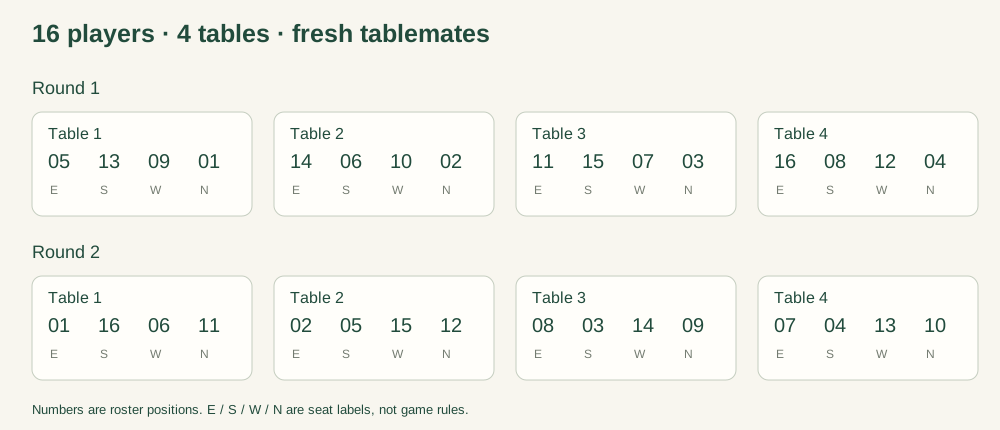
The generator uses fixed, tested seating templates rather than a fresh random shuffle. It checks how often every pair of players shares a table and reports the number of different pairs and repeat pairs. One table of four creates six tablemate pairs. A repeated pair means two people share a table in more than one round; it does not mean an entire table repeats.
The seat check follows each person's East, South, West and North labels across the selected rounds. Those labels help guests find a consistent place at the table. They do not determine the dealer, affect scoring, apply a Charleston procedure, or override your club's rules. This tool plans seating between blocks of play; it does not tell players how to move during a game.
If you want background on other ways clubs move players, see Mahj Life's guide to player rotation. Different hosting formats serve different needs. That resource is independent of this tool, and its methods are not a description or endorsement of our templates.
By table is useful for the host: it groups assignments by round and table number. Before guests arrive, label the physical tables with the same numbers and agree on which edge represents each seat. At the end of a round, announce the next round number and ask players to follow their next assignment. Leave time to move and settle before play resumes.
Player cards gather one person's assignments for all selected rounds. Choose that view before selecting Print / PDF. Your browser controls the printer, paper size and Save as PDF option; this site does not upload a document to a PDF service. Check the preview for clipping and page breaks, especially with long names or a different paper size. Shorter display names can make cards easier to scan.
The CSV contains the gathering name, round, table, seat and player for every assignment. Keep a copy if you need a record after closing the tab. Editing a downloaded spreadsheet does not update the online chart. If attendance changes, return to the planner, confirm a supported player count, generate a new plan, and replace the old printouts so guests do not follow conflicting versions.
Yes. Generating plans, viewing player cards, printing, saving through your browser's PDF option, and exporting CSV are free in this version. There is no signup, subscription or payment step.
This version supports exactly 12 or 16 players and three or four rounds. It does not produce byes, substitute players or a five-table draw. Do not put two guests under one name to force a different group size into a supported template.
The checks cover tablemates, complete seating and different seat labels. They do not guarantee that each player visits every physical table. Check the individual player card if table movement matters to your event, for example because one guest needs a particular location.
It can help arrange a social American mahjong gathering, but it is not tournament-management software. It has no scores, timed rounds, rankings or rule enforcement. For a competition, follow the organizer's approved draw and movement rules. This independent tool is not affiliated with the NMJL.
The roster fills positions in a fixed template. Renaming a position preserves its assignments. To change which real people meet, reorder the names and generate again, then review the result. Regenerating unchanged inputs gives the same plan; it is not a randomization button.
The planner does not save names between visits. Keep a CSV or PDF before closing or reloading this page. A shared link opens the tool, not your guest list or a saved copy of your event.
The planner processes names in your browser tab and does not send them to a planning API. It does not use an account, roster database or browser storage to retain your list. Normal website requests still reach the hosting server; that is separate from uploading the names you type. Downloaded files and printed copies contain your roster, so share them with the people who need the schedule.
Use initials or player numbers if guests prefer not to put full names on a public chart. The prefilled names are examples. Replace them with your own list, or clear them to generate numbered positions. Start your mahjong table rotation when your final attendance is confirmed.